Cloud Store @ NGNLIVE

Showing posts with label encrypt message. Show all posts

Friday, May 6, 2011

[Chinese]Secure SMS簡介

Secure SMS是一個客戶端加密/解密應用程序,允許想要一點隱私的用戶透過短信溝通,程式先對他們要發出的信息內容進行加密,然後將它發送出去給收件人。 只有正確解密碼的簡訊收件人能夠解密原來加密的短信和讀取信息。
程式特色亮點包括
1。 點對點通信等安全信息的AES - 128加密/解密機制
2。 增強隱私控制,可從終端設備默認收件箱中刪除收到信息
3。 為每個聯絡人設定單獨的加解密密碼或默認鍵為所有人使用同一加解密碼(可啟用設置選項)
4。 設定個人密碼(PIN),用於訪問瀏覽頁面(可啟用設置選項)
5。 設定個人密碼(PIN),用於訪問設置頁面(可啟用設置選項)
6。 設定個人密碼(PIN),用於訪問密鑰管理頁面(可啟用設置選項)
7。 在狀態欄通知收到安全短消息以及一鍵點擊查看
應用程式的屏幕截圖如下

homescreensettings securesms-sendsms-inprocess

解密加密的SMS(短消息)瀏覽頁面

securesms-decryptsms

您可以通過最流行的PayPal服務購買儲值點數(充值點)使用服務。

topup

您可以從Android Market通過網址https://market.android.com/details?id=com.ngnlive.plmn.securesms 獲得程式資訊
請不要猶豫,請為我們的應用程序在Android Market評分5分,您也可以到我們的Facebook臉書粉絲網頁說聲"讚" http://goo.gl/Dwm5S
若您想要了解更多有關AES - 128細節,您可以從Wikipedia網站取得相關資訊http://en.wikipedia.org/wiki/Advanced_Encryption_Standard

[English]How-to use Secure SMS

First of all, you have to define encrypt/decrypt key pair for people you want to exchange secure message on keys management page.
Assuming your mobile no. is 098zzzzzzz and you want to exchange secure message with a contact whose mobile is 0935xxxxxx
1. Click on the keys mgt. from menu page
2. Type in this person's mobile no. in Contact mobile file
3. Random type in a string used for encryption key for your outgoing message to this contact on "Encryption key" field
4. Type in the decrypt string given by this contact (refer explanations in next step) which will be used to decode message from him/her on the "Decrypt key" field

keysmgt keysmgt-add-step1 keysmgt-add-step3

On your counterpart's phone (contact people with the mobile no. 0935xxxxxx mentioned in earlier steps), repeat the same procedures for keys exchange definition as below
As you can see, he/she define your mobile (098zzzzzzz) in his/her keys mgt. page where
a. Key value defined in this contact's "Encryption key" field is the same value as you entered in your "Decrypt key" field (refer above screen)
b. Key value defined in this contact's "Decrypt key" field is the same value as you entered in your "Encrypt key" field (refer above screen)

keysmgt-update-step3

Don't forget to click on the "Add xxx" or "Update xxx" button to save the keys definition for later use after finished keys definition.
Once done, either one can send secure message to his/her counterpart using the "send" function on main screen.
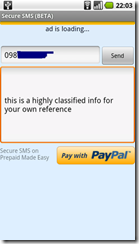
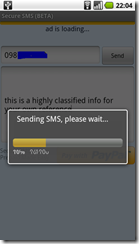
securesms-sendsmssecuresms-sendsms-inprocess

Shortly after, the targeted recipient will get a notification on his/her phone's status bar
Slide down the notification page, you will see a message from Secure SMS.

securesms-bparty-statusbarsecuresms-bparty-notification

He/she can click on the notification to view the decrypted encrypted message from sender immediately.
Note for message with incorrect decrypt key defined, you will only see original encrypted message instead as demonstrated in message ID 1.

securesms-decryptsms

1. assistant sending confidential or classified information to boss
2. lovers exchange messages and want to keep those messages confidential inside the two only
3. bank / portal send one time OTA password to clients enhance security
4. business partners exchange confidential information or price quote
... and lots more we believe your will have your own creative way of using it. Smile

Well, that's basically all of what you need to get started. Have fun and hope you like our work.

Please don't hesitate to rate it as 5-star for our application in Android Market at https://market.android.com/details?id=com.ngnlive.plmn.securesms and "like" it on our Facebook fans' page at http://goo.gl/Dwm5S.

A big thanks to you in advance!

[English]What's Secure SMS

icon Secure SMS is a client-side encrypt/decrypt application which allows user who wants a bit of privacy on SMS communication to encrypt their message content before sending it out to people. Only targeted recipient who has the correct decrypt key would be able to decrypt the encrypted SMS and read the message.
Feature highlight of the application includes
1. peer-to-peer secure message communication by AES-128 encrypt/decrypt mechanism
2. remove of messages from device's default inbox for enhanced privacy control
3. separate keys for each individual contact or a default key for all (can be enabled on settings option)
4. password (PIN) required for accessing message view page (can be enabled on settings option)
5. password (PIN) required for accessing settings page (can be enabled on settings option)
6. password (PIN) required for accessing keys management page (can be enabled on settings option)
7. incoming secure message notification on status bar and one click to view
Screen shots of the application below

securesms-sendsms-inprocess homescreen menu-settings

Decrypt of encrypted SMS (short message) on view page

securesms-decryptsms

You can purchase credits (Top Up points) via most popular PayPal service for use in the application.

topup-paypal

You can download the application from Android Market at https://market.android.com/details?id=com.ngnlive.plmn.securesms
Please don't hesitate to rate it as 5-star for our application in Android Market at https://market.android.com/details?id=com.ngnlive.plmn.securesms and you can "like" it on our Facebook fans' page at http://goo.gl/Dwm5S.
For those of you who want to know more about AES-128, you can check it out from WIKIPEDIA web site at http://en.wikipedia.org/wiki/Advanced_Encryption_Standard